
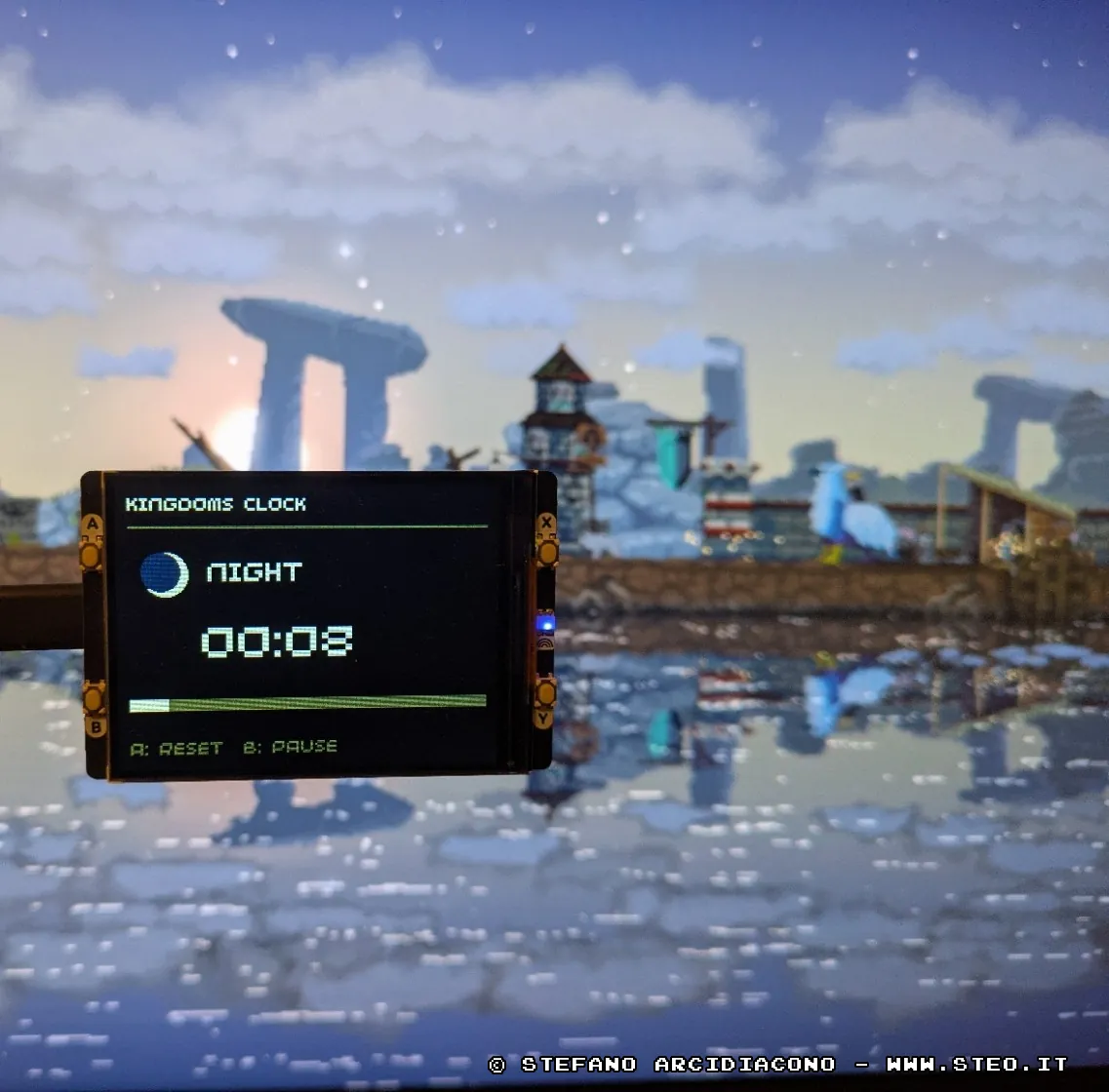
Kingdom Clock with Pimoroni Pico Display 2.8

Last year I bought the "Pico Display 2.8 " from Pimoroni along with a Raspberry Pi Pico, and I’ve used it for the weirdest and most useless things possible. The other day I started playing Kingdom Two Crows again and thought to myself, "How cool would it be to have a clock tracking the in-game time?" So, another weird and useless project…
I looked up how time works in the game online and quickly found out that across the entire Kingdom series, a full day lasts 4 real-world minutes:
- 2 minutes and 45 seconds for daytime
- 1 minute and 15 seconds for that damn night
I opened Gemini, gave it the context to create the script, and then tweaked it to my liking. It shows the day/night progress with a bar and timer, changes the LED color, and lets you pause or reset using the A/B buttons.
To sync the timer, just press button A when a new day starts—usually indicated by the crown appearing in the bottom right corner or the day counter showing up.
Here it the code of main.py for MicroPython:
import time
from machine import Pin
from pimoroni import RGBLED
from picographics import PicoGraphics, DISPLAY_PICO_DISPLAY_2, PEN_RGB332

# Display init (320x240 in landscape)
display = PicoGraphics(display=DISPLAY_PICO_DISPLAY_2, rotate=0, pen_type=PEN_RGB332)
display.set_backlight(0.8)

# RGB LED init
led = RGBLED(26, 27, 28)

# RGB LED Brightness (da 0.0 a 1.0)
LED_BRIGHTNESS = 0.01

# Key Config (A, B, X, Y on Pico Display 2.8)
button_a = Pin(12, Pin.IN, Pin.PULL_UP)
button_b = Pin(13, Pin.IN, Pin.PULL_UP)
button_x = Pin(14, Pin.IN, Pin.PULL_UP)
button_y = Pin(15, Pin.IN, Pin.PULL_UP)

# Colors (RGB332 format)
BLACK = display.create_pen(0, 0, 0)
WHITE = display.create_pen(255, 255, 255)
YELLOW = display.create_pen(255, 220, 0)
BLUE = display.create_pen(20, 40, 120)
GRAY = display.create_pen(100, 100, 100)
RED = display.create_pen(200, 50, 50)

# Day & night durations
DAY_DURATION = 165   # 2m 45s
NIGHT_DURATION = 75  # 1m 15s
TOTAL_CYCLE = DAY_DURATION + NIGHT_DURATION # 240 sec (4 minuti)

# Timer
time_elapsed = 0
is_paused = False

def set_dimmed_led(r, g, b):
	scaled_r = int(r * LED_BRIGHTNESS)
	scaled_g = int(g * LED_BRIGHTNESS)
	scaled_b = int(b * LED_BRIGHTNESS)
	led.set_rgb(scaled_r, scaled_g, scaled_b)

def draw_sun(x, y, r):
	# Sun icon
	display.set_pen(YELLOW)
	display.circle(x, y, r)

def draw_moon(x, y, r):
	# Moon icon
	display.set_pen(WHITE)
	display.circle(x, y, r)
	display.set_pen(BLUE)
	display.circle(x - 4, y - 2, r - 2)

def update_display(elapsed, paused):
	cycle_time = elapsed % TOTAL_CYCLE

	if cycle_time < DAY_DURATION:
		phase = "DAY"
		time_left = DAY_DURATION - cycle_time
		bg_color = BLACK
		accent_color = YELLOW
		set_dimmed_led(255, 200, 0) # Yellow LED
	else:
		phase = "NIGHT"
		time_left = TOTAL_CYCLE - cycle_time
		bg_color = BLACK
		accent_color = WHITE
		set_dimmed_led(0, 50, 200) # Blue LED

	if paused:
		phase = "PAUSE"
		set_dimmed_led(100, 100, 100)

	# Clear screen
	display.set_pen(bg_color)
	display.clear()

	# Upper text
	display.set_pen(WHITE)
	display.text("Kingdom Clock", 10, 10, 300, 2)

	# Line
	display.set_pen(GRAY)
	display.rectangle(10, 35, 300, 2)

	# Icon and status
	if phase == "DAY":
		draw_sun(40, 75, 18)
	elif phase == "NIGHT":
		draw_moon(40, 75, 18)
	else:
		# Gray circle for pause
		display.set_pen(GRAY)
		display.circle(40, 75, 10)

	display.set_pen(accent_color)
	display.text(phase, 75, 63, 200, 3)

	# Countdown value
	mins = time_left // 60
	secs = time_left % 60
	time_str = f"{mins:02d}:{secs:02d}"

	# Big countdown
	display.set_pen(WHITE)
	display.text(time_str, 70, 115, 200, 5)

	# Progress bar
	bar_width = 300
	bar_max_time = DAY_DURATION if phase == "DAY" or (cycle_time < DAY_DURATION and not paused) else NIGHT_DURATION
	progress = int((bar_width * time_left) / bar_max_time)

	display.set_pen(GRAY)
	display.rectangle(10, 180, bar_width, 10)
	display.set_pen(accent_color)
	display.rectangle(10, 180, progress, 10)

	# Keys info
	display.set_pen(GRAY)
	display.text("A: Reset  B: Pause", 10, 215, 300, 2)

	display.update()

# Loop
last_tick = time.ticks_ms()

# Update display
update_display(time_elapsed, is_paused)

while True:
	current_tick = time.ticks_ms()

	# A key: reset
	if button_a.value() == 0:
		time_elapsed = 0
		is_paused = False
		update_display(time_elapsed, is_paused)
		time.sleep(0.3) # Debounce semplice

	# B key: pause
	if button_b.value() == 0:
		is_paused = not is_paused
		update_display(time_elapsed, is_paused)
		time.sleep(0.3) # Debounce semplice

	# Timer tick
	if not is_paused and time.ticks_diff(current_tick, last_tick) >= 1000:
		time_elapsed += 1
		last_tick = current_tick
		update_display(time_elapsed, is_paused)

	time.sleep(0.01)
Happy gaming! 🍺